![Metron-icon-diagram-2.png]](https://www.metronlab.com/hs-fs/hubfs/Metron-icon-diagram-2.png?height=40&name=Metron-icon-diagram-2.png)
Table of contents
4- File ingestion in the METRON Platform
1. Introduction
Data file ingestion can be used to add new data to the platform, in addition to data automatically collected.
To do this, you need to upload your files to an SFTP server in accordance with the specifications below.
👉 The SFTP connection is automatically established when each METRON platform is created.
👉 You can upload data files on a regular basis or all at once.
❗ If you ingest new data with the same type, serial name and timestamp as existing data, the existing data will be overwritten by the newly ingested data.
PLEASE Do not use this process in addition to automatic data collection process (API, METRONlab, SFTP, billings ...)
2. Data file specifications
A) File format
For your file to be properly ingested, the format must be:
- .xls or .xlsx (with 1 sheet maximum)
- .csv respecting the requirements below:
-
Column separator : , (comma), ; (semicolon), (tab), (space), | (pipe)
-
Decimal separator : , (comma) or . (dot)
-
💡 We recommend to use .csv file formats.
🤓 You cannot have the same column and decimal separator (ex : comma and comma)
B) File composition
- Standard Process files
- Tagpath column name:
- A-z: all letters of the alphabet can be read, in upper and lower case
- À-ÿ: all accents are accepted, in upper and lower case
- 0-9: all numbers are accepted
- - and / are accepted
- Tagpath column name:
-
-
- must be different from "time" and "value"
- Value column name:
- A-z À-ÿ 0-9 - and / are accepted
- must be different from "time" and "tagPath"
- Time column name: no character limitation, must be different from "value" and "tagPath"
-
-
- All columns must have a different name
- Multi axis Process files:
- no character limitation
- All columns must have a different name
- Production files:
- Filters columns names: must be different form "time", "durationMs", "value", "tagIds"
- Variables columns names:
- A-z À-ÿ 0-9 - and / are accepted
-
-
- must be different from "time", "durationMs", "value", "tagIds"
- All columns must have a different name
-
C) Other file specifications
💡 Any field may be quoted (with double quotes).
Example :
"TagName","Timestamp","Value","Status""158.ELE370100","2025-01-15 00:00:00","138.7876","Good"
"158.ELE370100","2025-01-15 00:01:00","136.7472","Good"
⚠️ The maximum file size allowed is 2Mb.
⚠️ The METRON platform does not accept data older than 5 years. If you ingest a file containing data both before and after 5 years, only data less than 5 years old will be ingested into the platform.
⚠️ When you name your file, please do not use the forbidden characters / and "
3. File deposit on the SFTP
Once your file is ready, you have to upload it in the right place in Filezilla:
- Choose between "Production" or "Process", according to the type of data in your file;
- Choose "continuous_ingestion" if you wish to upload files on a regularly basis, otherwise choose "historic_one_shot".
To resume, if we consider that the folder is called myFolder, it will necessarily have one of these 4 paths:
- Process/continuous_ingestion/myFolder/
- Process/historic_one_shot/myFolder/
- Production/continuous_ingestion/myFolder/
- Production/historic_one_shot/myFolder/
👉 Zip files are accepted only if the files inside have the same format.
⚠️ Please do not create sub-sub folders: it will not be managed by the data ingestion feature.
🆘 If you have trouble to respect the file specifications, please create a ticket to the Helpdesk.
4- File ingestion in the METRON Platform
Prior to the file ingestion, a Data Ingestion Config must be defined in the METRON platform.
To learn more, please read the article Data ingestion Config on METRON-EOM platforms.
- Your SFTP server contains those different files :
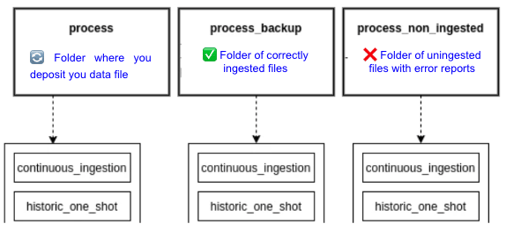
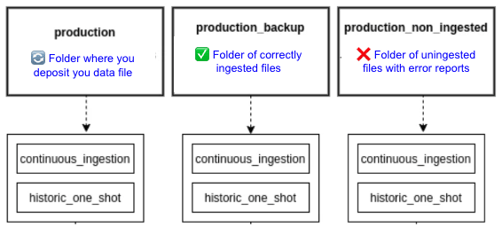
To check if your file has been ingested or not, verify the "_backup" and "_non_ingested" folders.
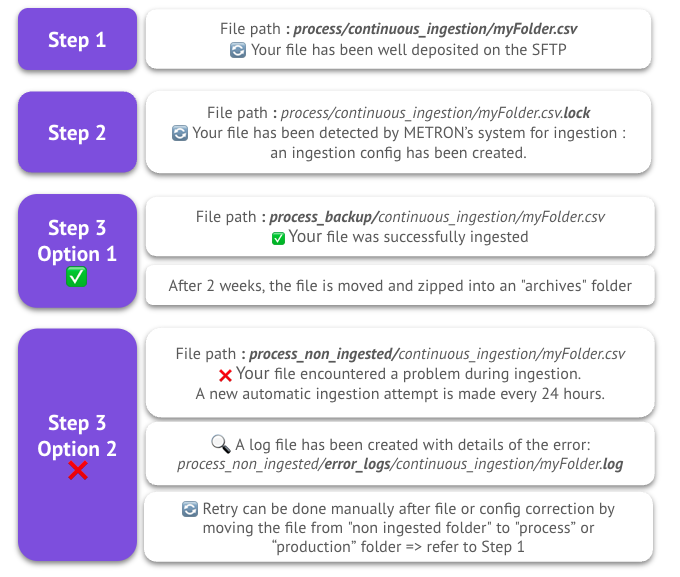
- Recap of your file lifecycle: