![Metron-icon-diagram-2.png]](https://www.metronlab.com/hs-fs/hubfs/Metron-icon-diagram-2.png?height=40&name=Metron-icon-diagram-2.png)
Set dynamic thresholds for your gauges
A gauge is a visual indicator for checking a quantity and comparing it with certain reference values. Until now, these reference values could only be fixed constants:
You can now define dynamic reference thresholds by selecting a series from your data sources:


Application example:
With the gauge widget, you can compare the kWh consumption of a machine with a theoretical consumption based on a reference model calculated in real time.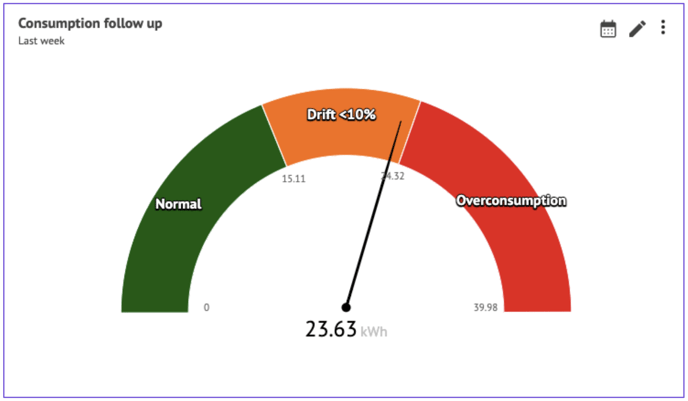
1/ Example of first dynamic threshold: "normal consumption".
2/ Example of second dynamic threshold: "drift".
3/ Example of the third dynamic threshold: "overconsumption".
Apply the period of your choice for each widget
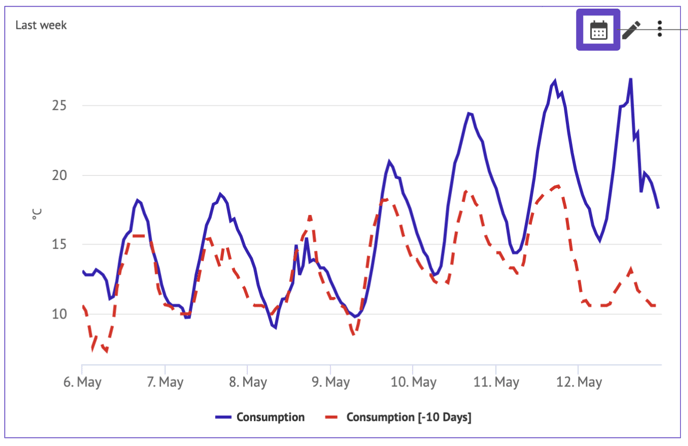
A "calendar" shortcut has been added to the top right-hand corner of each widget, allowing you to modify the periods displayed widget by widget.
By clicking on "apply", the change will only be reflected on your profile, with no impact on other users of your platform. After refreshing the page or logging in again, the period will return to its default setting.
By clicking on "save", the selected period becomes the default period and applies to all users viewing this widget.
Advanced parameters for creating calculated series
To make the creation of calculated series more accessible, the extrapolation and offset functions will now be found in the advanced parameters.