![Metron-icon-diagram-2.png]](https://www.metronlab.com/hs-fs/hubfs/Metron-icon-diagram-2.png?height=40&name=Metron-icon-diagram-2.png)
New design for your dashboards tree structure ... and new features coming soon!
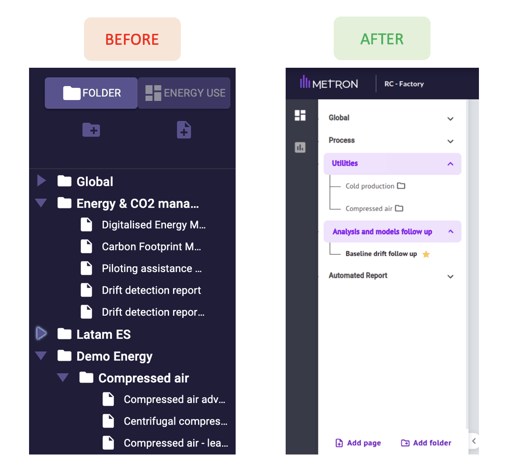
We completely rework the tree structure of your dashboards. This week, you can see the new design below. It will be accompanied by new features in the next release.
Please note that for the next release at the end of June, the "Energy Use" tree structure will disappear. As a reminder, this will not remove any dashboards. Please contact your Project Manager for more information.
Page load times halved
Observe the BEFORE/ AFTER result below:
Duplicating models on EnergyLab
It is now possible to duplicate a model on the EnergyLab space, even when it is deployed.
Why duplicate an EnergyLab model?
To apply to a piece of equipment a template created for another piece of equipment. By duplicating it, you can take over its fundamentals by simply modifying the series used.
To modify an already deployed model. A deployed template can no longer be edited.
Step 1
Duplicate the model 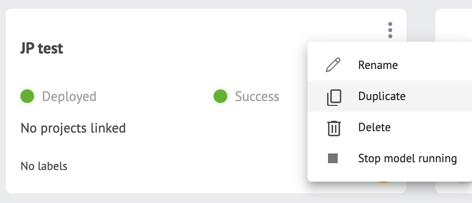
It takes a few seconds for the tool to check whether the model can be duplicated. If the "Duplicate" button is grayed out, move your mouse over it to see if this feature is loading or if the template is not duplicable.
Step 2
Modify the series selected for model calculation, if necessary.
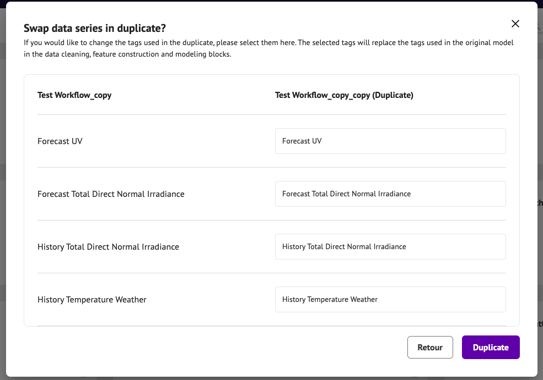
Step 3
Duplication is fully automatic unless the model includes point cloud cleaning. 
Now all you have to do is deploy!
To sum up:
Alarms: New "Mark all as read" button
You can now clear notifications for all your alarms with a single click, thanks to the new "Mark all as read" button: