![Metron-icon-diagram-2.png]](https://www.metronlab.com/hs-fs/hubfs/Metron-icon-diagram-2.png?height=40&name=Metron-icon-diagram-2.png)
➡️ When to use the offset function
The main use of the offset function is to enable comparisons between different time periods of the same tag.
For example, if you want to calculate the percentage change in energy consumption between this year and last year.
➡️ What is "offset"?
The offset feature enables users to “shift” the timestamp of series in a calculation 🔙. In other words, shifting allows the values of "past" timestamps to be compared with the value of the "present" timestamp.
Example: if we offset an A series by 1 month, the value of A indicated at time T will be equal to the value of A at time T minus 1 month.
This is useful for estimating the percentage of change from one year to the next, for reports for example.
➡️ How to use it
The offset is available in the calculation creation space: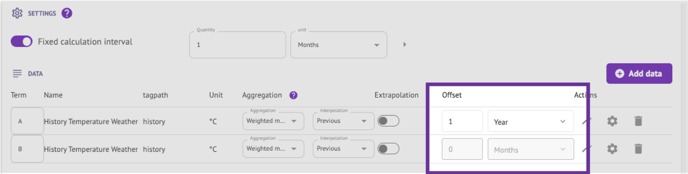
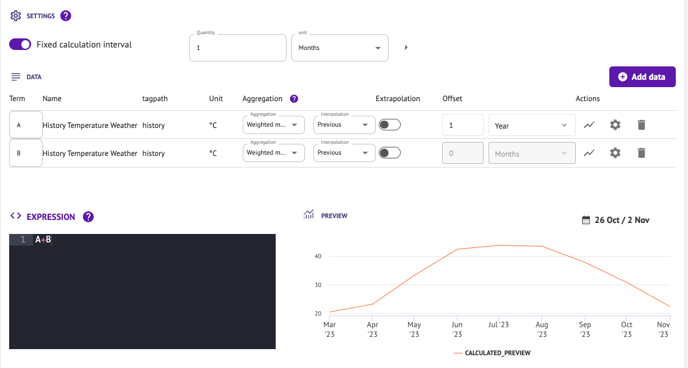
If variable A is offset by one year, when A is used in the calculation, the result will use the value of A from last year. For example, if I type "A+B" in the formula console, the result will be A(last year)+B(today).
➡️ Other important information :
- There must be at least one non-offset series (i.e. with an offset value of 0) in each calculation (in other words, you must select at least 2 time series to be able to use the offset option).
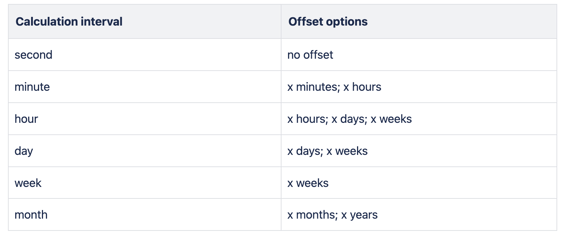
- The offset period must always be greater than or equal to the calculation interval.
- The offset can only be used with fixed calculation intervals.